Plan, write and publish your social media in one place
Connect your organisation's Facebook Pages, Instagram, LinkedIn, X, TikTok and Telegram channels. Write a post once, adjust it for each network, let AI draft the captions, then publish now or schedule it. Approvals keep everyone on message.
Design once. Adapt it everywhere.
Start with 10,000+ new platform-specific social templates, build photo posts or multi-scene short videos, then resize, export or send the result to the planner.
10K+ new social templates
Instagram posts, Stories, Reels and carousels; TikTok trends, tutorials and product demos; YouTube thumbnails and Shorts; plus Facebook, LinkedIn, Pinterest, X and Snapchat.
Editable video scenes
Short-form video templates open with real moving sample footage, editable Hook → Value → CTA overlays, scene timing and an optional soundtrack. Replace the clip, add your own video or audio, then export an MP4.
Motion + audio library
Use built-in motion clips and original audio loops, or upload your own video and soundtrack. A compact timeline keeps scene duration, motion and project audio visible while you edit.
Copy & resize
Turn one design into editable copies for other social formats without rebuilding it from scratch.
From idea to published post
The planner lives in the MyPDF console, next to the editor, so a flyer you design can become a post in a couple of clicks.
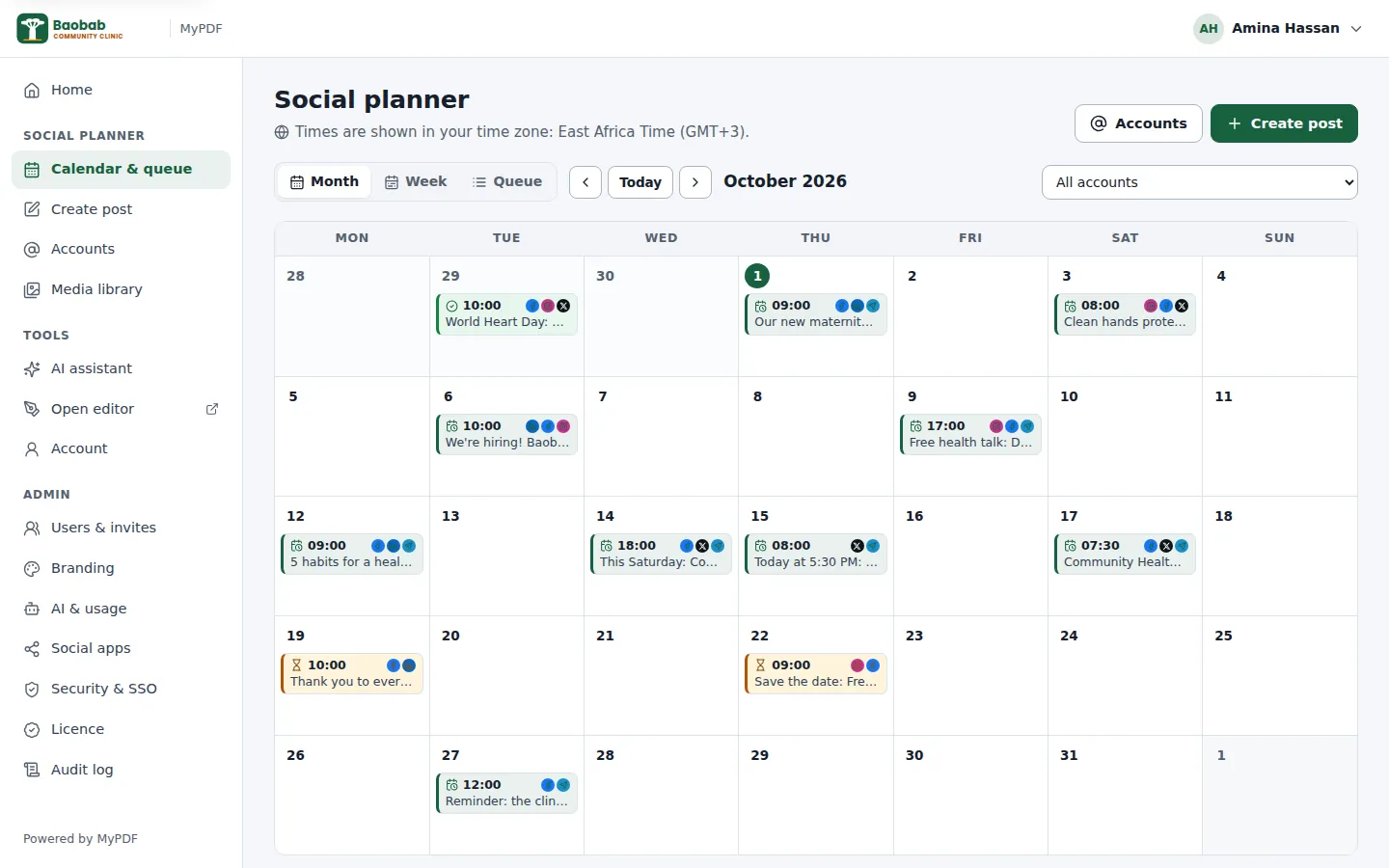
Calendar & queue
See the month or the week at a glance, or a queue of scheduled posts, drafts, posts awaiting approval, published and failed posts. Drag a scheduled post to another day to move it.
One post, a version per network
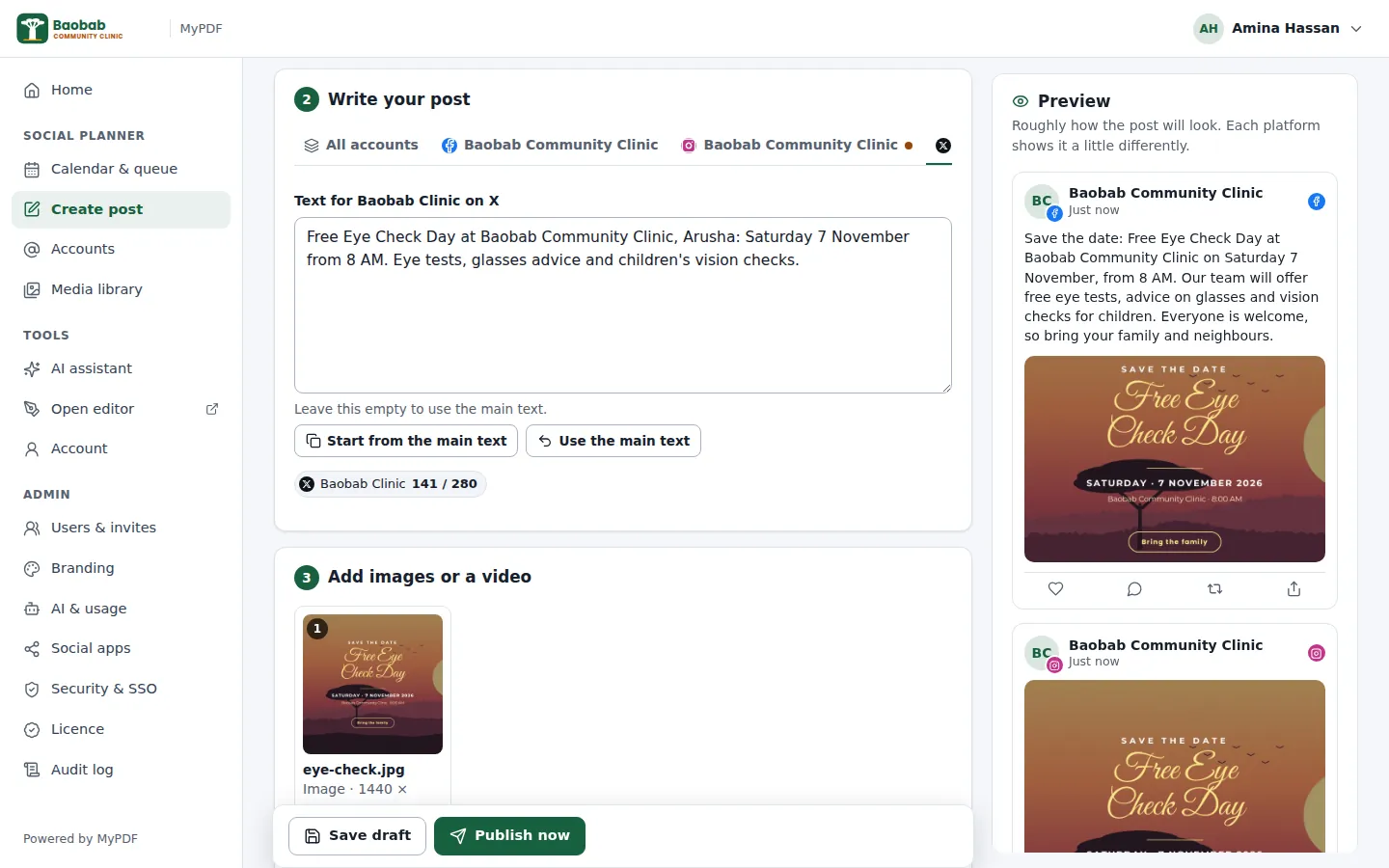
Write the main text once, then give any account its own version, such as a shorter one for X. A preview shows roughly how each post will look.
Live checks
Character counts and each network's rules are checked as you type: text limits, the number of photos, whether a video is allowed, and more.
AI captions
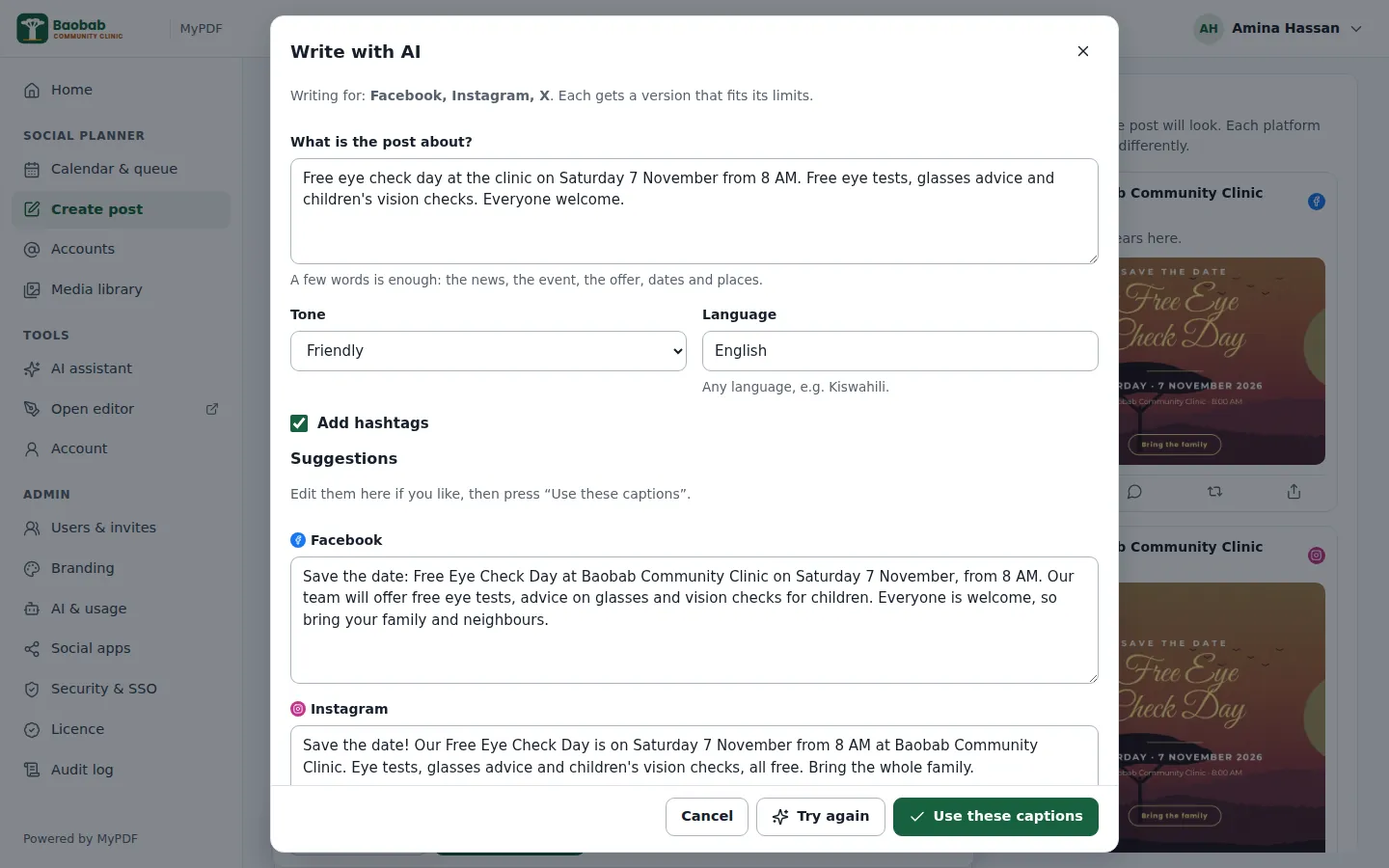
Describe the post in a few words, pick a tone and a language, and get a caption for each network that fits its limits, with hashtags if you want them.
Publish now or schedule
Pick a date and time in your organisation's time zone, such as Africa/Nairobi. MyPDF publishes on time and tries again if a network is briefly unavailable.
Approvals
Turn on approvals and members' posts wait for an admin, who approves them or sends them back with a reason. Admins' own posts go straight out.
Media library
Images (JPEG, PNG, WebP or GIF up to 20 MB) and videos (MP4 or MOV up to 200 MB), shared by your organisation and ready to reuse.
Straight from the editor
Finished a design? Choose Download → Post to social media and it opens in the planner as an image, or as a carousel of pages.
Failed posts & retry
If a network refuses a post, you see the reason for each account, and the author and admins get an email (when email is set up). Fix it and press Retry: accounts that already published aren't posted to twice.
The right words for every network
Tick the accounts, write your post and add images or a video. Use the tabs to give an account its own text; the counter shows how much room is left, and links on X count as 23 characters, as X counts them.
- Previews for each network
- Save a draft, publish now, or schedule
- TikTok options: who can watch, comments, Duet and Stitch
A first draft in seconds
Press Write with AI, describe the post in a few words, and choose a tone such as Friendly or Professional and a language such as Kiswahili. You get a version for each network to edit before you use it.
- Each caption respects the network's limits
- Suggested hashtags, or none if you prefer
- Uses your organisation's AI provider and brand voice
Your organisation's accounts, shared safely
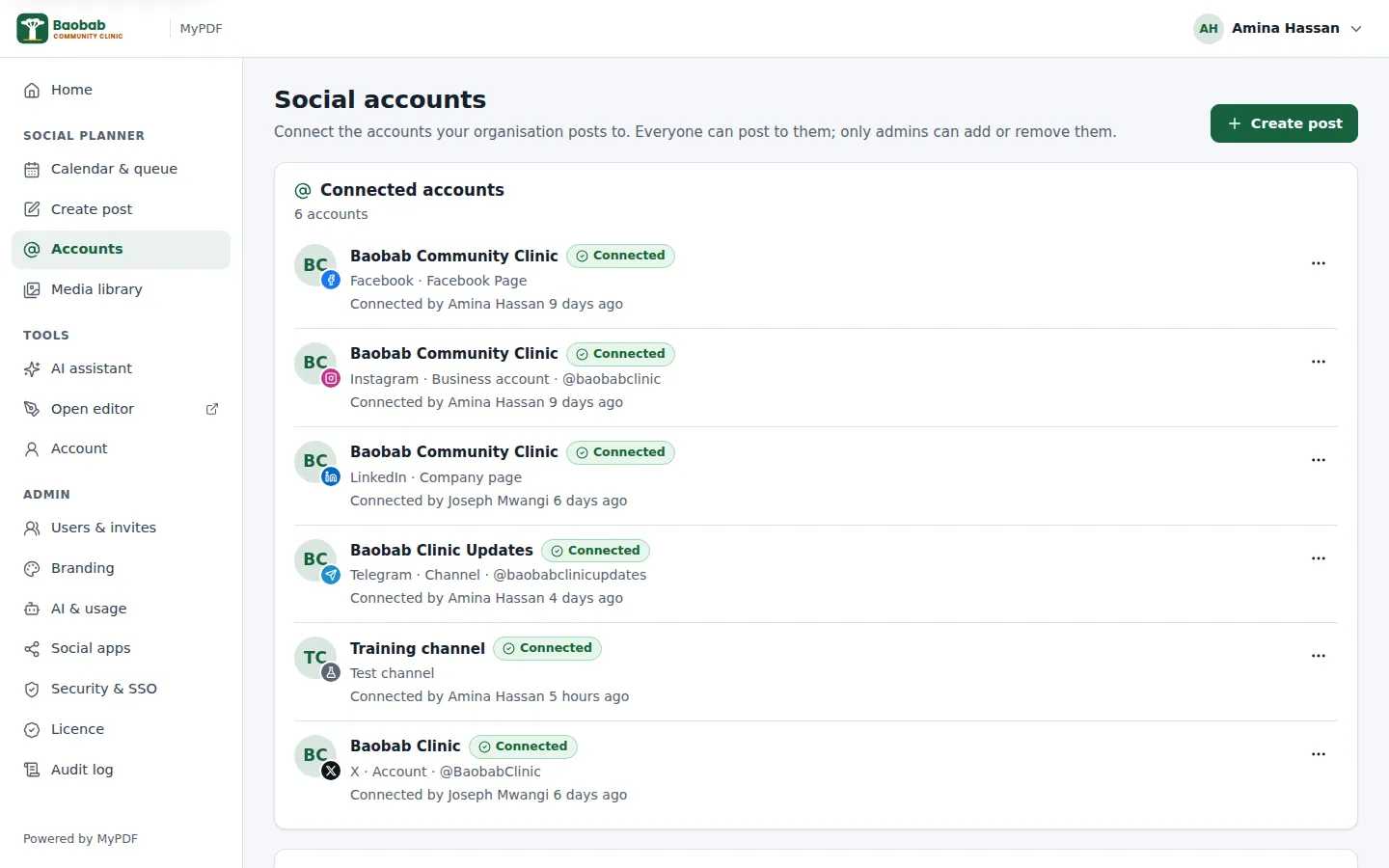
Admins connect the organisation's pages and channels once. Everyone with access can then post to them, with approval if you want it. Nobody needs the account passwords.
- Only admins can add or remove accounts
- Sign-ins are stored encrypted on your server
- If a network ends a sign-in, the account shows Reconnect and admins get an email
What each network allows
Every network has its own rules. MyPDF follows them and tells you in plain words when something won't work, before you publish.
Facebook Pages
- Posts to Pages you manage, not to personal profiles
- Up to 10 photos or one video (not both)
- Needs a Business or Creator account linked to a Facebook Page
- Every post needs 1–10 photos or videos; one video posts as a Reel
- Captions up to 2,200 characters and 30 hashtags; Stories aren't supported
- Personal profiles; company pages once LinkedIn approves your app for company pages
- Up to 3,000 characters, 20 images or one video
- Sign-ins last 60 days, then an admin reconnects
X
- 280 characters; links count as 23 and many emoji as 2
- Up to 4 images, or one video or GIF
- X charges for its API, so your organisation needs X API credit
TikTok
- One video per post; photo posts aren't supported
- Until TikTok approves your organisation's app, posts are private (only the account owner can see them)
Telegram
- Channels and groups, through a bot you create with @BotFather and add as a channel admin
- Text up to 4,096 characters; captions on photos up to 1,024
- Videos up to 50 MB
Test channel
Posts to the Test channel are recorded in MyPDF, with the exact text and pictures, but sent nowhere. Use it for training, demonstrations and trying out approvals.
Your organisation's own apps
MyPDF publishes through developer apps that your organisation registers with each network, so posts come from you, not from us. Meta and TikTok review apps before everyone can use them, which can take days or weeks. See the admin guide.
Nothing goes out without the right eyes on it
- A member writes a postand chooses the accounts and a time.
- It waits for approvalunder “Awaiting approval” in the calendar.
- An admin reviews itand approves it, or rejects it with a reason.
- MyPDF publishes itat the chosen time, or straight away.
When email is set up, authors hear when their post is approved or rejected. Every published and failed post is recorded in the audit log.
Ready to plan your posts in one place?
The social media planner is included in every organisation plan, with a 30-day free trial.