You don't need an account to use the editor. With one, you'll hear about new features first, and it's where saved templates and document history will live once those features arrive.
This guide is about accounts on mypdf.live. If your organisation runs its own MyPDF, your administrator invites you and you sign in at your organisation's address. See Organisation admin.
Create an account
- Go to Create account.
- Enter your name, email and a password of at least 8 characters. The bar shows how strong it is.
- Optionally add your organisation, main use and country. This helps us build the right features.
- Accept the terms and click Create account. You're signed in straight away.
Signed in inside the editor
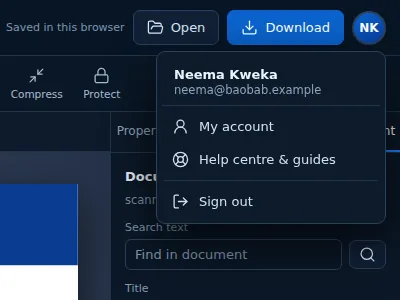
Your sign-in works on both mypdf.live and the editor at app.mypdf.live. In the editor, your initials appear at the top right. Click them for My account, the Help centre and Sign out. Your name is used for typed signatures and comments.
Update your profile
Open My account → Profile to change your name, phone, organisation, job title, country, main use, preferred language and newsletter choice. Click Save profile.
Password, email and devices
Under Sign-in & security you can:
- Change your email (you'll need your password);
- Change your password, and sign out of all other devices at the same time;
- see where you're signed in and sign out any device you don't recognise;
- review recent activity, including failed sign-in attempts.
Forgot your password? Use Forgot password on the sign-in page. If email reset isn't available, contact us from your account's email address.
Download or delete your data
Under Data & privacy, Download my data gives you a JSON file with everything we hold about your account. Delete account permanently removes your profile and history after you enter your password and type DELETE. We never store your documents, so there are none to delete.
Still stuck? Contact us and tell us what you were trying to do. We read every message.